Author: anonymousmedia_tal70o

  • Using AI Gemma 3 Locally with a Single CPU

    Using AI Gemma 3 Locally with a Single CPU


    Several months ago, I got a Nucbox K8 Plus minicomputer to use as a Proxmox 9 server. At the time of this acquisition, I didn’t realize this minicomputer had an artificial intelligence (AI) engine [1] build in the CPU that could be used to run AI applications locally. A coworker recommended that I try Google Gemma 3 as a local AI open model to work with my use cases.

    “Gemma is a family of generative artificial intelligence (AI) models and you can use them in a wide variety of generation tasks, including question answering, summarization, and reasoning.” [2], a review of the Gemma 3 key features is also posted on this page. This page [3] lists the minimum requirements for the 5 Gemma 3 models 270M, 1B, 4B, 12B, and 27B.

    Default Open WebUI
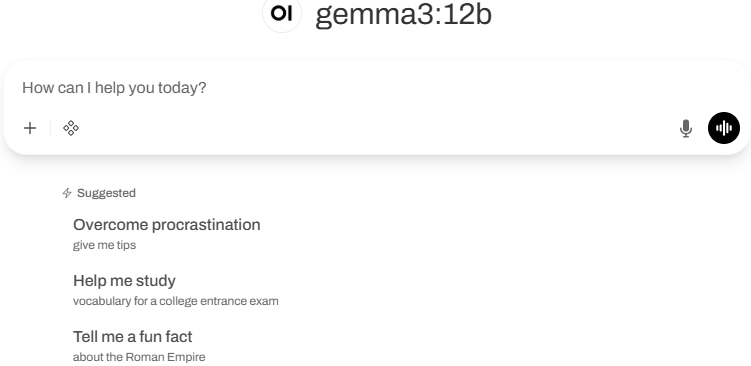
    My Setup with Open WebUI

    • OS is a Linux Container (LXC) Ubuntu 24.04
    • Ollama with gemma3:12b [4]
    • Open WebUI [5]

    Installing Ollama with Gemma 3

    I used these steps to get Gemma setup. First review the requirements for RAM [3] before deciding with Gemma 3 model to install. You can start small (i.e. 4B or smaller) for testing before using a larger model. I’m using  4B and 12B with 16 GB of RAM with my installation. 

    If you want to test some queries before installing the WebUI, this last command will open the interpreter:

    ollama run gemma3:4b

    Since I have a Ryzen 7 CPU, my next step was to install the admgpu [7] software to use the AI features of the CPU. The last step is to install the graphical interface to work from a browser using the Open WebUI [5] and there are several models listed here to get the WebUI running. I had to try a few combinations; in the end this is what I used:

    sudo docker run -d -p 80:8080 -v ollama:/root/.ollama –add-host=host.docker.internal:host-gateway -v open-webui:/app/backend/data –name open-webui –restart always ghcr.io/open-webui/open-webui:main

    Bugs in Proxmox 9 for LXC and AppArmor

    For the Linux Container to run correctly, I had to edit the edit the LXC config file (114 is the container number) and add those two lines:

    vi /etc/pve/lxc/114.conf

    • lxc.apparmor.profile: unconfined
    • lxc.mount.entry: /dev/null sys/module/apparmor/parameters/enabled none bind 0 0

    And it may also be necessary to add this as well in the sudo command before installing the docker: –security-opt apparmor:unconfined

    Login WebUI Interface

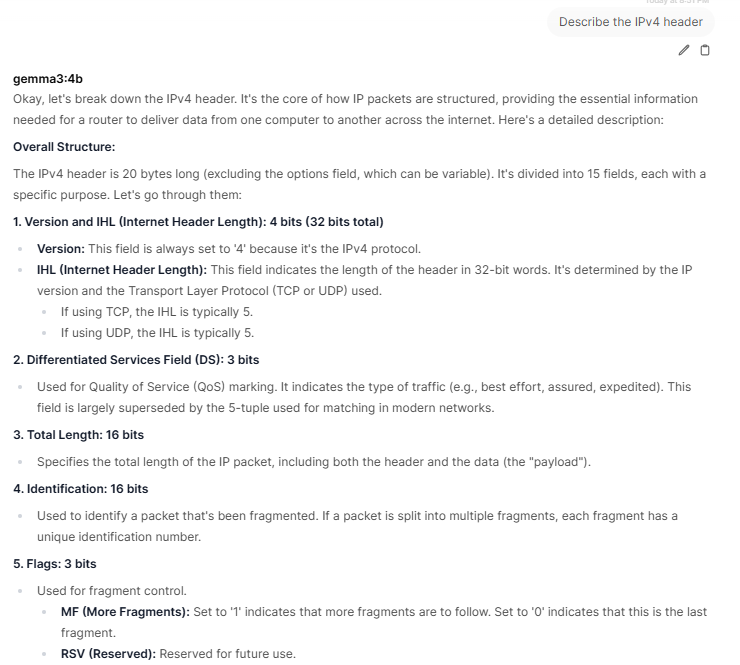
    After the installation of the WebUI, you need to create the first admin account before being able to login.My first query asked my AI to describe the IPv4 header:
    Gemma 3 offers the ability to work with large files with its 128K context, work with images and has multilingual support which is practical if you know multiple languages. Finally, it can run locally in PC, laptop and smartphone on a single GPU or TPU and smaller devices. If you have experience using Gemma 3, what are the use cases you are using it? You can add your comments in our contact form.

    [1] https://www.amd.com/en/products/processors/laptop/ryzen/8000-series/amd-ryzen-7-8845hs.html

    [2] https://ai.google.dev/gemma/docs/core

    [3] https://ai.google.dev/gemma/docs/core#sizes

    [4] https://deepmind.google/models/gemma/gemma-3/

    [5] https://github.com/open-webui/open-webui

    [6] https://ai.google.dev/gemma/docs/integrations/ollama?utm_source=deepmind.google&utm_medium=referral&utm_campaign=gdm&utm_content

    [7] https://rocm.docs.amd.com/projects/radeon-ryzen/en/latest/docs/install/installryz/native_linux/install-ryzen.html

    [8] https://forum.proxmox.com/threads/priviledge-container-disabling-apparmor-does-not-work.122168/

    [9] https://blog.ktz.me/apparmors-awkward-aftermath-atop-proxmox-9/

    [10] https://docs.openwebui.com/

    ———–

    Guy Bruneau IPSS Inc.

    My GitHub Page

    Twitter: GuyBruneau

    gbruneau at isc dot sans dot edu



    Source link

  • Wireshark 4.6.2 Released, (Sun, Dec 14th)

    Wireshark 4.6.2 Released, (Sun, Dec 14th)


    Wireshark release 4.6.2 fixes 2 vulnerabilities and 5 bugs.

    The Windows installers now ship with the Visual C++ Redistributable version 14.44.35112. This required a reboot of my laptop.

    Didier Stevens
    Senior handler
    blog.DidierStevens.com

    (c) SANS Internet Storm Center. https://isc.sans.edu Creative Commons Attribution-Noncommercial 3.0 United States License.


    Source link

  • CISA Adds Actively Exploited Sierra Wireless Router Flaw Enabling RCE Attacks

    CISA Adds Actively Exploited Sierra Wireless Router Flaw Enabling RCE Attacks


    Dec 13, 2025Ravie LakshmananNetwork Security / Vulnerability

    The U.S. Cybersecurity and Infrastructure Security Agency (CISA) on Friday added a high-severity flaw impacting Sierra Wireless AirLink ALEOS routers to its Known Exploited Vulnerabilities (KEV) catalog, following reports of active exploitation in the wild.

    CVE-2018-4063 (CVSS score: 8.8/9.9) refers to an unrestricted file upload vulnerability that could be exploited to achieve remote code execution by means of a malicious HTTP request.

    “A specially crafted HTTP request can upload a file, resulting in executable code being uploaded, and routable, to the webserver,” the agency said. “An attacker can make an authenticated HTTP request to trigger this vulnerability.”

    Cybersecurity

    Details of the six-year-old flaw were publicly shared by Cisco Talos in April 2019, describing it as an exploitable remote code execution vulnerability in the ACEManager “upload.cgi” function of Sierra Wireless AirLink ES450 firmware version 4.9.3. Talos reported the flaw to the Canadian company in December 2018.

    “This vulnerability exists in the file upload capability of templates within the AirLink 450,” the company said. “When uploading template files, you can specify the name of the file that you are uploading.”

    “There are no restrictions in place that protect the files that are currently on the device, used for normal operation. If a file is uploaded with the same name of the file that already exists in the directory, then we inherit the permissions of that file.”

    Talos noted that some of the files that exist in the directory (e.g., “fw_upload_init.cgi” or “fw_status.cgi”) have executable permissions on the device, meaning an attacker can send HTTP requests to the “/cgi-bin/upload.cgi” endpoint to upload a file with the same name to achieve code execution.

    This is compounded by the fact that ACEManager runs as root, thereby causing any shell script or executable uploaded to the device to also run with elevated privileges.

    The addition of CVE-2018-4063 to the KEV catalog comes a day after a honeypot analysis conducted by Forescout over a 90-day period revealed that industrial routers are the most attacked devices in operational technology (OT) environments, with threat actors attempting to deliver botnet and cryptocurrency miner malware families like RondoDox, Redtail, and ShadowV2 by exploiting the following flaws –

    Cybersecurity

    Attacks have also been recorded from a previously undocumented threat cluster named Chaya_005 that weaponized CVE-2018-4063 in early January 2024 to upload an unspecified malicious payload with the name “fw_upload_init.cgi.” No further successful exploitation efforts have been detected since then.

    “Chaya_005 appears to be a broader reconnaissance campaign testing multiple vendor vulnerabilities rather than focusing on a single one,” Forescout Research – Vedere Labs said, adding it’s likely the cluster is no longer a “significant threat.”

    In light of active exploitation of CVE-2018-4063, Federal Civilian Executive Branch (FCEB) agencies are advised to update their devices to a supported version or discontinue the use of the product by January 2, 2026, since it has reached end-of-support status.


    Source link